Movie Ranking Application
MERN + TMDB app with Dockerized deployment and CI/CD
Start: June 2025 • End: July 2025
MERN + TMDB app with Dockerized deployment and CI/CD
Start: June 2025 • End: July 2025
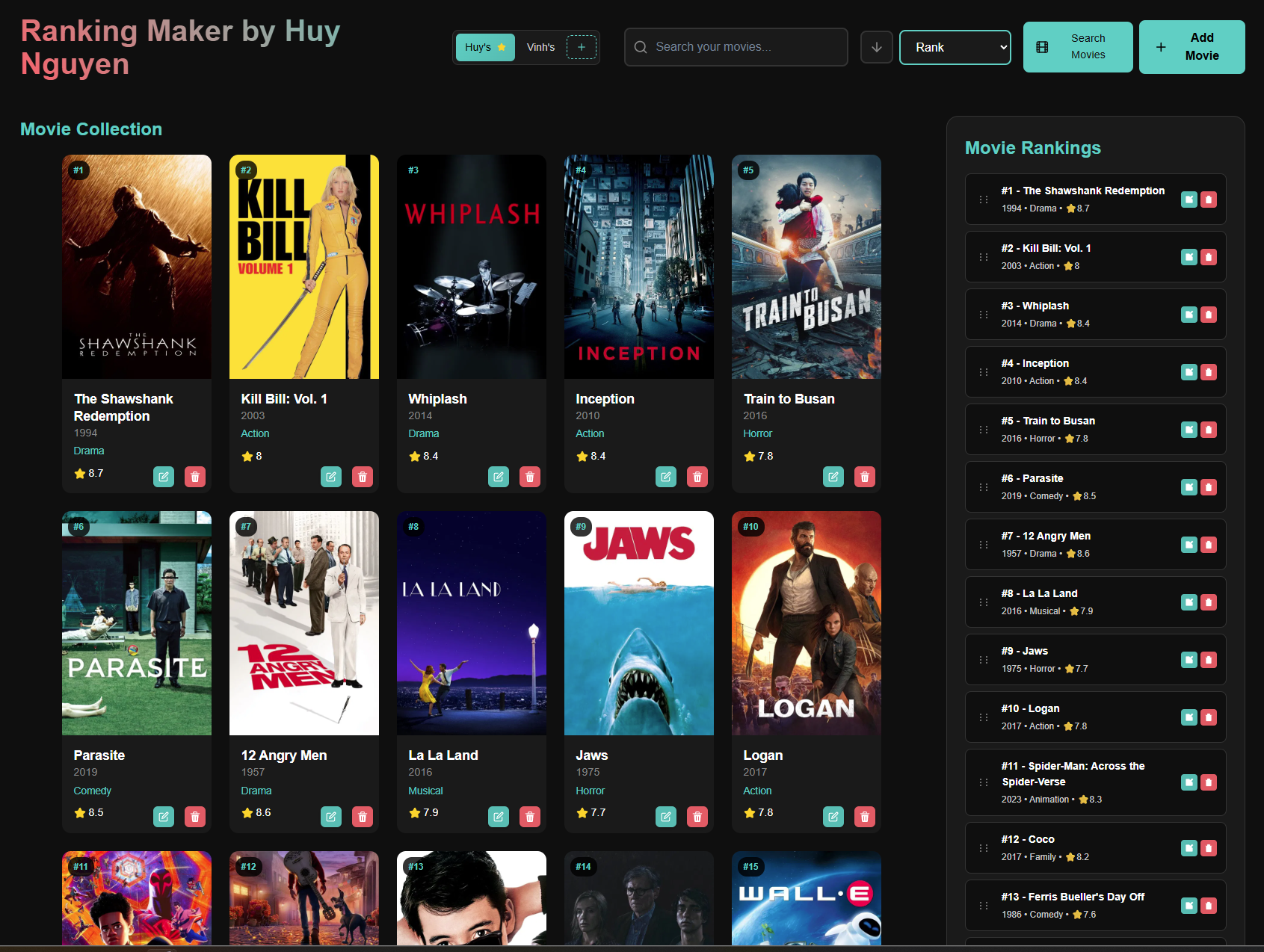
This project is a movie ranking web application built with the MERN stack and TMDB API integration in the MVC (Model-View-Controller) architecture. Users can rank their favorite movies using the custom drag-and-drop UI and search up movies to add using the TMBDI API. Sorting and searching functionality is also included. Aside from the features, I containerized the app with Docker, deployed to AWS EC2 behind NGINX, and set up GitHub Actions CI/CD to streamline updates.
I created this as a fun project for my father because he expressed that he wanted to rank his Top 50 movies. This was also my first MERN stack project aside from a tutorial I had followed prior.
1) Learning the MERN stack. For around 2 weeks, I followed a tutorial on a smaller, separate project to learn how to set up a backend, frontend, and deploy it. I learned how to test backends using Postman, create components in React, and create a basic API using Express.js. Here is the separate tutorial for learning MERN: MERN Stack Tutorial
2) Designed the data model. Chose a simple MongoDB schema to represent movies (name, year, genre, etc.). You can find the schemas in backend/model/movie.model.js in the code repository. The schema for separate movie lists would be added later to support multiple lists.
3) Implemented the backend API. Built a RESTful CRUD API in Express using a previous project as reference. You may view the controller and route folders in the code repository.
4) Built the React UI. Most difficult aspect of the project was implementing the custom drag-and-drop reordering since I wanted it to look a certain way. Creating the UI movie cards was relatively simple.
5) Integrated TMDB. Added TMDB API fetch for autofilling movie info instead of manually adding it for each movie
6) Deployment to EC2 instance. After taking a day to learn Docker, I containerized the code, deployed to an AWS EC2 instance behind NGINX, and created a GitHub Actions CI/CD pipeline.
Create and maintain ranked lists with a drag-and-drop UI designed for easy reordering.
Movies can searched for in the TMBD database to prefill movie data and movie lists can be sorted by name, year, genre, rank, rating.
MongoDB-backed persistence for user rankings and saved items across devices.
Deployed to AWS EC2 with NGINX reverse proxy for stable routing and serving.
Challenge: Initially, the deployment kept failing with SSH timeout errors, even though I could SSH to the instance from my local machine without issues.
Solution: First, I isolated the problem by checking that the EC2 instance was running, port 22 was open, security group rules were configured correctly, and SSH connectivity worked locally. I discovered that GitHub Actions runners use dynamic IP addresses that weren't covered by my security group rules. I redesigned the deployment architecture to so that GitHub Actions builds the Docker image and pushes it to Docker Hub instead of using SSH for the EC2 instance. I created an auto-deploy script on the EC2 instance that pulls the latest image and restarts the container. I was then able to successfully deploy.
Complete system architecture showing the CI/CD pipeline, AWS EC2 deployment, and request flow: